
ADATA · الذاكرة
ADATA RAM DDR5 U-DIMM 32GB 5600 PCDDR5-5600 U-DIMM · 32GB
من 399 د.أمتوفر
مقارنة عبر 6 متاجر

DDR5-5600 U-DIMM · 64GB
• 64 GB Capacity: Single high-capacity DDR5 U-DIMM for compatible desktop systems. · • DDR5-5600: 5600 MT/s memory speed with CL46-45-45 latency. · • Low Voltage: 1.1 V DRAM operating voltage. · • DDR5 Technologies: Built-in PMIC and on-die ECC. · • Desktop Form Factor: Standard 288-pin U-DIMM configuration.
غالباً المنتج نفسه — مطابقة بالعلامة والطراز، لا برقم قطعة من المُصنّع.
| المتجر | السعر | التوفر | الإجراءات |
|---|---|---|---|
 City Centerالأقل | 899 د.أ | متوفر | زيارة المتجر |
 OfficeJo Computer And Printer Shop | 905 د.أ | متوفر | زيارة المتجر |
 CompuMe | 943.95 د.أ | متوفر | زيارة المتجر |
 Computers Mall | 950 د.أ | متوفر | زيارة المتجر |
تتطابق هذه العروض في العلامة والطراز دون رقم قطعة من المُصنّع، لذلك التطابق مرجّح وغير مؤكد. راجع المواصفات قبل الشراء بناءً على السعر وحده.
أضيف أقل عرض 2026-10-23 · حُدث 2026-11-22 · آخر تغيير للسعر 2026-11-25
| Product Specifications | |
|---|---|
| Manufacturers Link | https://www.adata.com/en/consumer/category/computer-memory/dram-module-ddr5-5600-u-dimm/ |
| Memory Specifications | |
| Type | DDR5 |
| Capacity | 64 GB |
| Cas Latency | 45 |
| Speed | 5600 MHZ |
| Voltage | 1.1V |
| Heat Spreader | Yes |
| RGB Lighting | No |
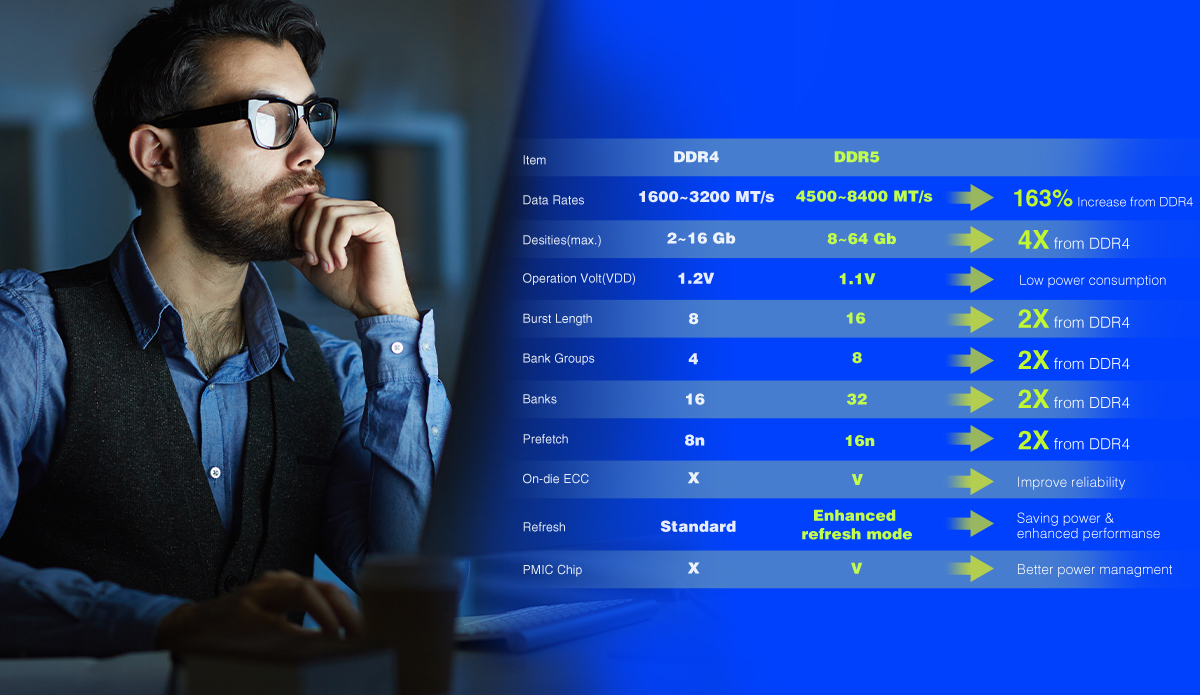
The DDR5-5600 U-DIMM delivers blazing frequencies of up to 5600 MHz, a major leap from the max. frequency of DDR4 modules (3200 MHz).
This next-gen memory module operates on just 1.1V, making it 8% more power-efficient than DDR4. What's more, it features a built-in Power Management IC (PMIC) to enhanced power supply stability.
This memory module's architecture allows for more memory bank groups and banks. With the same area, more bank groups can be packed into the module, doubling what was possible with DDR4, giving you higher capacities.
With error correcting code (ECC) this module can correct errors automatically in real-time. In addition to greatly reducing the burden of CPU calculations, it also provides increased stability and reliability for enterprise-class computers.
DDR5 U-DIMM modules have the same dimensions and pin count as DDR4 modules. The most obvious difference is the position of the fool-proof notch. Also, DDR5 integrates I/O resistors with CMD/ADD resistors. Also, the appearance of DDR5 modules are cleaner than DDR4. In addition, you can see a PMIC in the center.
DDR5 modules provide two times more capacity than DDR4 by packing in more banks and bank groups. In addition, Burst Length, Prefetch are also doubled, increasing the number of data writes and the amount of data taken upfront. And to ensure data integrity, they feature error correcting code (ECC) technology.
The biggest change is that bandwidth and frequency are significantly higher. The ADATA DDR5 memory modules deliver frequencies of up to 4800MHz and feature bandwidth of 38.4GB/s, which is 50% higher than the DDR4-3200. The maximum frequency is increased 1.63 times compared to DDR4.
After confirming the installation with the memory device that is suitable for the system, please follow the steps as below:
The occurrence of the blue screen may be resulted from many factors; the hardware may affect the parts including RAM, motherboard, hard disk and power supply. To verify whether or not it is a problem RAM, it’s recommended to use the RAM test software, Memtest86+. If there is a red error message, it’s confirmed to be the DRAM problem, please contact the customer service agent.
In many cases, the BIOS or diagnostic program will report the memory bus frequency, which is half of the memory frequency. Because the rate of DDR data transfer (double data transfer) is twice the memory bus frequency. If the bus speed is 800MHz, and DDR3-1600 memory is used, the correct memory operating speed is at 1600.
If the new memory does not belong to the same brand as before, you can consult the memory compatibility of your computer manufacturer.
If it is inconvenient to send repairs to the service center, you can apply for repair online on XPG’s official website.
After completing the application, please follow the instructions to properly package the product and return it to the designated address. We will carry out the repair process for you as soon as possible after receipt.
The service center only provides service for the repair of products (the appearance of the product must not exhibit external damage, and the stickers must be intact). The warranty scope and authenticity of the product will be determined by the original factory based on the physical product received. It is recommended that you file a clear picture of the front and back of the product before sending it for repair.
【Important reminder: If your memory needs to run dual channels, please send both modules together for repair to facilitate dual channel testing.】
CPU-Z can be recognized as one of the most classic computer system information software, the relevant information about testing current computer device:
Channel: The number of channels that are used in the operations of the Memory Device. In the example, the number of channels is 4, which means that the system will combine the bandwidth of the 4 memory devices to increase transmission performance.
FSB and DRAM ratio: The ratio of front side bus (FSB) frequency and DRAM Frequency
RAM Timing Benchmarks (CL, tRCD, tRP, tRAS, tRFC, CR): Each of the 6 different benchmarks individually represents the frequency cycle required for different DRAM operations.
QVL stands for Qualified Vendor List, which is provided by a motherboard manuafacturer to guarantee that memory can work with the motherboard.
When purchasing DDR5 DRAM, you should understand the motherboard features first and confirm the supported memory frequency by checking the QVL.
Two DIMMs per channel (2DPC) application technology is different from dual-channel. It is recommended to set the frequency reduction specification to ensure overclocking stability. For example, if you want to go up to 6,000 MT/s you need to buy a DRAM capable of 6,400MT/s. The main reason is the limitation of the motherboard. When supporting memory, the overclocking characteristics can be optimized through the BIOS. However, when four channels are inserted, higher specifications are needed to meet the system requirements of the BIOS, so that the system can run stably even in the overclocked state.
At present, motherboard makers have not yet released the QVL with 4 channels. Therefore general consumers cannot find out the list of four-channel memory from the official website of the motherboard brands.
According to each different BIOS designs of the board manufacturers, memory is shared with the motherboard-
Design of memory device varies with different memory capacities, its configuration depends on the best system performance that varies with the motherboard design by different manufacturers.
An external memory doesn’t always increase the computer’s performance. But, it’s helpful in the simultaneous multiple operations of more programs or procedures, or beneficial in operating the program that requires a large amount of memory. If the amount of memory that is originally installed doesn’t handle the programs or procedures that are operated, it’s possible to elevate the aspect of performance.
→ In Windows, please use the traditional view. Click on and open "System" to display the computer’s basic information, including the total RAM that is installed.
→ In MacOS, click on "About this Mac" or "About this Computer" from the Apple menu at the top-left corner. The information about the total memory in the Mac will be provided. (including built-in memory and externally installed DIMM or SIMM.)
→ In Linux, open a terminal window and enter the following command: cat /proc/meminfo to display the total RAM capacity as well as other memory information.
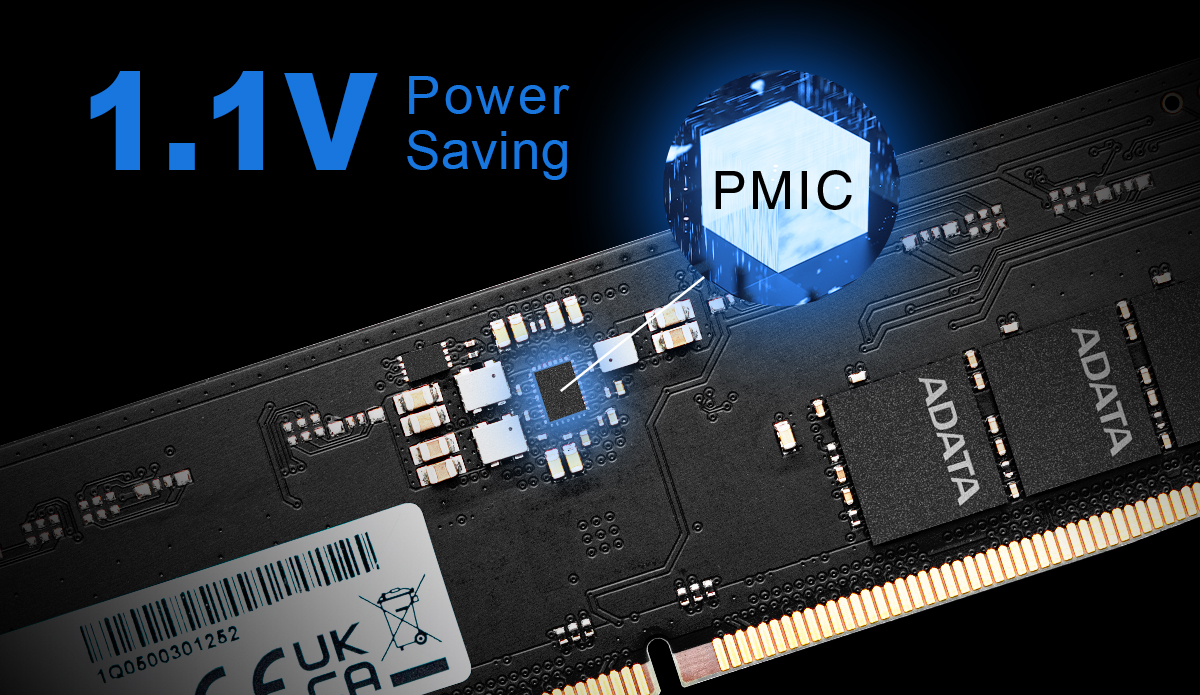


DDR5 technologies include an integrated Power Management IC for power-supply stability and on-die error correction. The module operates at 1.1 V DRAM voltage and uses a standard 288-pin DIMM form factor for compatible desktop platforms.
| Component | Specification |
| Brand | ADATA |
| Model Number | AD5U560064G-S |
| Product Type | Desktop Memory |
| Memory Type | DDR5 |
| Form Factor | 288-pin U-DIMM |
| Capacity | 64 GB |
| Package Configuration | Single Tray |
| Speed | 5600 MT/s |
| CAS Latency | CL46-45-45 |
| DRAM Voltage | 1.1 V |
| Power Supply | VIN = 5 V |
| Power Management | Built-in Power Management IC (PMIC) |
| Error Correction | On-Die ECC |
| Operating Temperature | 0°C to 85°C |
| EAN | 4711658153562 |
| Warranty | 1 Year |
استناداً إلى سجلات الأسعار المتاحة، وليس ضماناً لأعلى أو أدنى سعر على الإطلاق.
أقل سعر لدى 4 متاجر.
| التاريخ | السعر | التغيير | الأقل لدى |
|---|---|---|---|
| 2026-11-25 | 899 د.أ | -6 د.أ | City Center |
| 2026-11-23 | 905 د.أ | +6 د.أ | OfficeJo Computer And Printer Shop |
| 2026-10-23 | 899 د.أ | -6 د.أ | City Center |
| 2026-10-20 | 905 د.أ | أول تسجيل | OfficeJo Computer And Printer Shop |
DDR5-5600 U-DIMM · 32GB
مقارنة عبر 6 متاجر
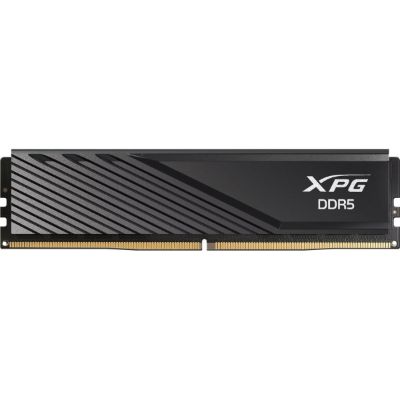
XPG Blade · 32GB
مقارنة عبر 3 متاجر