V2COM · شاشات الكمبيوتر
V2COM P7 15.6″ Triple Screen Extender Portable Monitor – Full HD IPS, 1920 x 1080, USB-C Plug & PlayP7 · 15.6 إنش
من 249 د.أمتوفر
مقارنة عبر 3 متاجر

P5 · 15.6 إنش
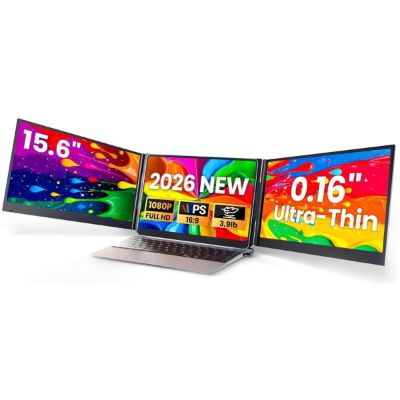
Rich Visual Experience】P5 15.6" full-screen bezel-less laptop screen extender provides a larger graphic display area for improved viewing experience, ease of operation and interaction. 1080P resolution, 300 nits of brightness, 1000:1 contrast ratio, a built-in speaker, HD and vivid image quality, immersive…
غالباً المنتج نفسه — 1 من 2 عروض تنشر رقم القطعة P5، والباقي مطابق بالعلامة والطراز.
| المتجر | السعر | التوفر | الإجراءات |
|---|---|---|---|
 City Centerالأقل | 119 د.أ | غير متوفر | زيارة المتجر |
 Eagle Computer | 119 د.أ | غير متوفر | زيارة المتجر |
تتطابق هذه العروض في العلامة والطراز دون رقم قطعة من المُصنّع، لذلك التطابق مرجّح وغير مؤكد. راجع المواصفات قبل الشراء بناءً على السعر وحده.
أضيف أقل عرض 2026-10-24 · حُدث 2026-11-24 · لم يُسجَّل أي تغيير للسعر
| Monitors Specifications | |
|---|---|
| Screen Size | 15.6" |
| Refresh Rate | 60 Hz |
| Panel Type | Full HD |
| Panel Technology | IPS |
| Contrast Ratio Static | 1000:1 |
| Resolution | 1920 x 1080 |
| Input Connectors | 2x USB Type C
1x USB C with DP |
| Brightness | 300 cd/m2 |
| Display Colors | 16.9 Million |
| Advanced Feature | |
| Color | Black |
A: At least 1 full function Type-C ports (support video & power output)
B: At least 1 HDMI port (support video output) +1 USB-A or 1 Non-functional Type-C port (support power output)
Note:
1. If the expansion screen shows "No Signal" after connecting the Type-C cable, it means that the C port of your laptop only supports power supply (i.e. non-full-function C port). Then you need to choose HDMI+USB-A or HDMI+Type-C connection option.
2. Be sure to plug the HDMI cable into the port labeled "USB C with DP" on the back of the screen. If the screen shows no signal after connecting with the HDMI+USB-A cable, try unplugging the HDMI cable and plugging it in again.
3. If the screen shows power saving mode reminder/flashing/black screen, it may be that your laptop has insufficient power or voltage. Please use an additional USB-A to Type-C cable to power the laptop monitor extender.
4. How to get brighter viewing: The first thing to try is powering the monitors from an external power supply. Then try to increase the “Backlight” setting, not just the “Brightness” setting.
5. Please feel free to send us a message through the “About Seller” section on the seller's homepage if you have any questions.
استناداً إلى سجلات الأسعار المتاحة، وليس ضماناً لأعلى أو أدنى سعر على الإطلاق.
أقل سعر لدى متجرين.
لم يتغيّر أقل سعر منذ تسجيله أول مرة في 2026-10-24، وهو حالياً 119 د.أ.
| التاريخ | السعر | التغيير | الأقل لدى |
|---|---|---|---|
| 2026-10-24 | 119 د.أ | أول تسجيل | City Center |
P7 · 15.6 إنش
مقارنة عبر 3 متاجر
P7 Pro · 15.6 إنش
مقارنة عبر 3 متاجر
Z2 · 15.6 إنش
فقط في Ammanzone
S5 Pro · 15.6 إنش
مقارنة عبر متجرين