Product
Product gallery · ADATA
ADATA · External drives
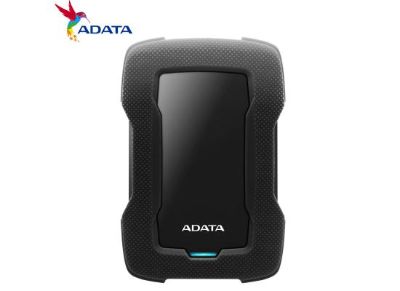
ADATA HD330 4TB COLOR BOX
HD330 · 4TB
External HDD Main group · Capacity 4TB · Color Black · Interface USB 3.2 Gen1 (backward compatible with USB 2.0) · Dimensions (L x W x H) 132.7 x 89.9 x 23.4mm · After Sales Support · Warranty 1 Year
Only at JoCell228 JOD
In stock
One part. Every option.
Prices in JOD| Retailer | Price | Availability | Actions |
|---|---|---|---|
 JoCell | 228 JOD | In stock | Visit retailer |
Only one retailer in this catalogue is listing this product. Confirm the final price with the retailer.
Lowest offer added 2026-11-15 · Updated 2026-11-25 · No price change recorded
Search for other retailer offersThe finer details
- Model
- HD330
- Brand
- ADATA
- Category
- External drivesStorage
- Capacity
- 4000 GBfrom the maker's site
From ADATA
View on ADATA's siteThe ADATA HD330 external hard drive with up to 5TB capacity keeps your data safe with a silicone casing on the outside, and ADATA’s proprietary shock sensors and Backup ToGo software. However, despite its durable nature the HD330 still maintains a slim 16.2mm form factor that’s nice to look at and easy to carry around.
The 1/2TB variants of the HD330 feature heights of 16.2mm, while the 4/5TB variants feature heights of 23.4mm.
The HD330’s tough defenses start from the outside with a robust, shock-absorbing silicone casing that can withstand the knocks, drops, and bumps of everyday life.
The HD330 comes in three colors – black, red, and blue. Pick the hue that best reflects your personality.
In an era of high-definition video content, you can never have too much storage space. With up to 5TB capacity the HD330 has you covered and is ready to back up all your music, movies, photos and more.
Lesser external drives continue to work even when dropped or encounter a shock, resulting in errors and bad sectors. With ADATA’s proprietary shock sensors, all drive activity will cease when a physical shock is detected. Once in the clear, activity resumes. You're kept fully informed with a clear status indicator.
The HD330 can be connected to game consoles and be used as backup storage for games that are not currently being played.
- Actual loading times may vary depending on the game. Reformatting may be required for the external HDD to work with game consoles.
Support for external storage devices varies by game console. Please click here to learn more.
Backup ToGo uses an algorithm to back all your data intelligently and with ease. Set your desired backup schedules and never worry about data loss again! What's more, Backup ToGo features a cloud backup function, which supports backup onto the cloud, local hard drives, and even on mobile devices. With Backup ToGo, users can enjoy a tool with an intuitive interface that makes data backup a snap!
Compatibility with specific host devices may vary and could be affected by system environment.
Connecting via USB 2.0 requires plugging in to two USB ports for sufficient power delivery. A USB Y-cable will be needed.
Please note that USB Implementers Forum recently rebranded USB 3.2 Gen1 to USB 5Gbps. For more information about the change, please check the announcement at www.usb.org.
For use with macOS devices, reformatting is required. Please click here to learn more.
HD330 dust and water proof ratings apply only when the USB port cover is firmly closed.
Datasheet-HD330 External Hard Drive | English | 757.04 KB | 2023-11-02 | Download
- Safely Remove: Please use the "Safely Remove Hardware" function before unplugging the hard drive to prevent data corruption.
- Avoid Collisions and Drops: When in use, please place the hard drive on a stable surface to avoid vibrations or impacts that could damage it.
- Prevent Overheating: Keep the hard drive well-ventilated during use and do not place it in high-temperature areas or direct sunlight.
- Stable Power Supply: Prioritize using the USB ports on the computer's main unit and avoid using unpowered USB hubs.
Q:Is it normal for a hard disk drive (HDD) to produce slight vibrations and sounds during high-speed operation?
The reasons for an external hard drive producing unusual noises could be aging, abnormalities in the circuit board, or read/write tracks. It could also be caused by the read/write head module inside the hard drive being displaced due to impact.
If the hard drive emits metallic clicking sounds and experiences slow read speeds or computer crashes, it is recommended to immediately back up your data, unplug the hard drive's power cable, and send it for repair.
Q:The external hard drive section of you webpage recommends the purchase of an additional Y-cable for installation. What is the purpose of the installation? Can it be done without a Y-cable?
A: The external hard drive requires a start-up current of over 600 milliamps, however USB 2.0 can only provide a maximum of 500 milliamps. As a result, it is recommended that you use a Y-cable we using with a USB 2.0 host devices.
Backup ToGo does not support an encryption function. Use of built-in Windows encryption software BitLocker is recommended (click here to enable BitLocker encryption mechanism on Windows 10 devices).
● Lack of power: The hard disk should be attached to the USB power cable connector into the USB slot on the back of the computer. Make sure your computer supplies enough power for the hard disk to run. Do not use a USB Hub, extension cord, or other USB devices together, because doing so may cause power undersupply, resulting in the external drive being unable to be read.
● Volume has not been added: In Windows XP/Vista/7 operating systems, go to Disk Management to confirm that the hard disk is installed.
A steady price
1 recordBased on the price records this catalogue holds — not a guarantee of an all-time high or low.
This retailer's price has not changed since it was first recorded on 2026-11-15, currently 228 JOD.
| Recorded | Price | Change |
|---|---|---|
| 2026-11-15 | 228 JOD | First recorded |
Keep your options open.
Explore external drives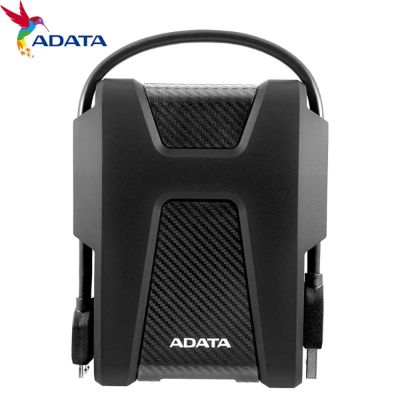
ADATA · External drives
ADATA HD680 2TB BLACK COLOR BOX External Hard DriveHD680 · 2TB, Black
115 JODIn stock
Compared across 2 retailers
ADATA · External drives
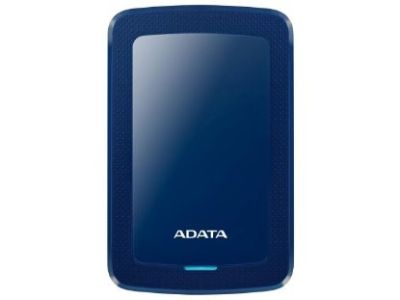
ADATA HV300 2TB COLOR BOXHV300 · 2TB
from 112 JODIn stock
Compared across 2 retailers