A little research. A better upgrade.Independent price comparisonJordan · JOD
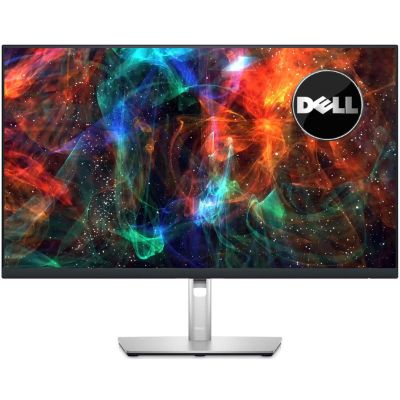
ProductDell P3223QE 32" IPS 4K Extensive Connectivity & ComfortView Plus w/ USB-C up to 90W & Adjustable Stand
Product gallery · Dell
Dell · Monitors

Dell P3223QE 32" IPS 4K Extensive Connectivity & ComfortView Plus w/ USB-C up to 90W & Adjustable Stand

P3223QE · 32 inch

16:9 widescreen resolution perfect for watching movies, playing video games and getting on with office work.Aspect ratio:16:9.Response time:5.0 milliseconds · 4K UHD 4K UHD offers ample amount of desktop space with more than 8 million pixels · DisplayPort interface that transmits both audio and video signals through a…

Only at City Center499 JOD
Out of stock
Prices checked 2026-11-21

One part. Every option.

Prices in JOD
RetailerPriceAvailabilityActions
City Center499 JODOut of stockVisit retailer

Only one retailer in this catalogue is listing this product. Confirm the final price with the retailer.

Lowest offer added 2024-01-20 · Updated 2026-11-21 · No price change recorded

Search for other retailer offers

The finer details

Model
P3223QE
Brand
Dell
Aspect Ratio
16:9
Panel Technology
IPS
Refresh Rate
60Hz
Response Time
5ms
Screen Brightness
350nits
Screen Ports
HDMI
Screen Resolution
4K UHD · 3840×2160
Screen Size
32"
Monitors Specifications
Screen Size 31.5"
Refresh Rate 60 Hz
Flat / Curved Flat
Panel Type 4K
Panel Technology IPS
Contrast Ratio Static 1000:1
Resolution 3840 x 2160
Response Time 5 ms
Display Port Yes
HDMI Yes
Brightness 350 cd/m2
Display Colors 1.06 billion colors
USB C Yes
Advanced Feature
Color Silver
Speakers No

Maximize your attention to detail with a 4K screen

Detail driven: 
Experience outstanding power, clarity and detail on a brilliant 80.01cm (31.5-inch), 4K hub monitor.

Extensive connectivity: 
Easily connect to a variety of devices with extensive connectivity ports, including HDMI, DisplayPort, USB-C, RJ45 and 4x SuperSpeed USB 5 Gbps. MAC Address pass-through, PXE Boot, and Wake-on-LAN are conveniently built in.

Custom set up for maximum efficiency

Designed with wellness in mind:
ComfortView Plus–an always-on, built-in low blue light screen–reduces potentially harmful blue light emissions without compromising color.

Beautifully functional:
The stunning black finish and small base compliment an improved cable management system that hides cords in the monitor riser. 

Convenient adjustability: 
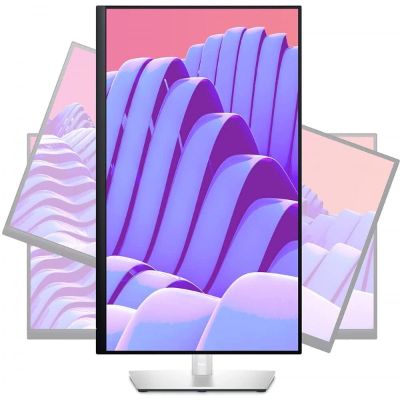
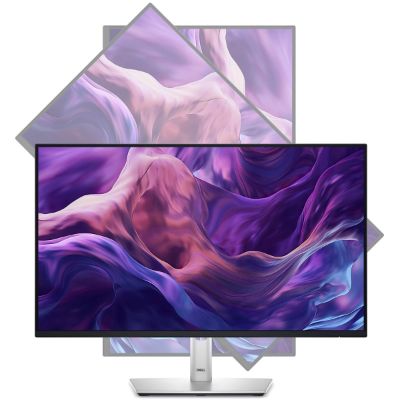
Experience made-for-you comfort by tilting, swiveling, pivoting and adjusting the height of your monitor (150mm max) for optimal viewing comfort.


Download Brochure

Turn your workspace into an organized productivity hub

Jumpstart productivity:
Simply press the monitor power button and the power sync feature seamlessly starts your monitor and connected Dell PC, even when the laptop lid is closed. Compatible with select Dell PCs.

Clutter-free setup:
Your monitor serves as your own productivity hub with RJ45 for wired Ethernet connectivity and USB-C providing up to 90W power delivery, all in a clutter-free setup.

Advanced multitasking with Dell Display Manager

Productive at every level: 
Easy Arrange allows you to easily tile multiple applications across one or more screens with 38 pre-set window partitions and the ability to personalize up to five windows, giving you improved multitasking abilities.

Seamless transitions: 
The auto-restore feature remembers where you left off, so applications will go back to where you left them, even after you’ve unplugged.

The key to convenience: 
Shortcut keys can save you even more time, letting you easily configure your display management settings so you can get to work faster.

More ways to manage: 
Asset management reports allow IT managers to quickly capture and track monitor information as well as configure multiple monitors at once through a single setup.
 
Download Dell Display Manager >

Green thinking: for today and tomorrow

Environmental standards: 
This monitor meets the latest regulatory and environmental standards such as EnergyStar® and TCO Certified Edge, and is EPEAT® Gold  registered.

Energy conservation: 
Save energy with PowerNap , a feature that dims or puts your monitor to sleep when it’s not in use.

Advancing sustainability: 
Dell Technologies is committed to reducing environmental impact throughout the product lifecycle. Read more about our commitment to sustainability and our 2030 Social Impact goals here, and our product’s carbon footprint here.

Connectivity options

Ports & Slots:
1. Security-lock slot (based on Kensington Security Slot™) | 2. AC power port | 3. HDMI port | 4. DisplayPort (in) | 5. USB-C port | 6. USB-A downstream port | 7. USB-A downstream port |
8. RJ45 connector | 9. USB-A downstream port | 10. USB-A downstream port | 11. Stand lock

Cables Included:
Power cable | DisplayPort to DisplayPort cable | USB Type-C cable | USB Type-A to USB Type-C cable.

A steady price

1 record

Based on the price records this catalogue holds — not a guarantee of an all-time high or low.

This retailer's price has not changed since it was first recorded on 2026-10-26, currently 499 JOD.

RecordedPriceChange
2026-10-26499 JODFirst recorded

Keep your options open.

Explore monitors