Kingston · SATA SSDs
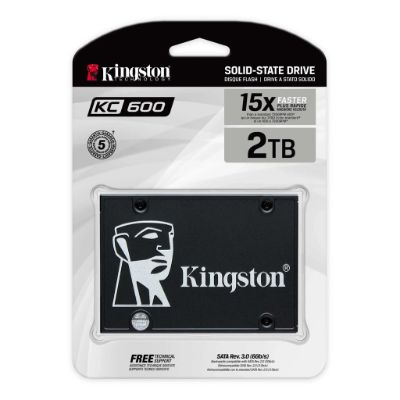
Kingston SSD KC600 2048GBKC600 · 2TB
from 229 JODIn stock
Compared across 9 retailers

KC600 · 1TB
1TB Kingston KC600 , 2.5″ SSD, SATA 3.0 (6Gb/s), TLC 3D NAND, 550MB/s Read, 500MB/s Write, 90k/80k IOPS
Likely the same product — matched on brand and model, not on a manufacturer part number.
| Retailer | Price | Availability | Actions |
|---|---|---|---|
 HiforitLowest | 69 JOD | In stock | Visit retailer |
 Green Dara Stars | 149 JOD | In stock | Visit retailer |
 GTS | 149.99 JOD | In stock | Visit retailer |
 Digital Ring for Technology | 160 JOD | In stock | Visit retailer |
 SSMJO | 164.99 JOD | In stock | Visit retailer |
 CompuMe | 189 JOD | In stock | Visit retailer |
 PC Circle | 189 JOD | In stock | Visit retailer |
 Oriental Store | 189 JOD | In stock | Visit retailer |
 MID Teks Inc | 97 JOD | Out of stock | Visit retailer |
 Compu Jordan | 99 JOD | Out of stock | Visit retailer |
 City Center | 119 JOD | Out of stock | Visit retailer |
 Smart Systems For Computers LLC | 119 JOD | Out of stock | Visit retailer |
 Eagle Computer | 159 JOD | Out of stock | Visit retailer |
 IGEEK Mega Stores | 159 JOD | Out of stock | Visit retailer |
These listings match on brand and model rather than on a manufacturer part number, so the match is likely but not confirmed. Check the specifications before you buy on price alone.
Lowest offer added 2026-11-24 · Updated 2026-11-26 · Last price change 2026-11-24
Kingston’s KC600 is a full capacity SSD designed to provide remarkable performance and optimized to provide functional system responsiveness with incredible boot, loading, and transfer times. It comes in both 2.5" and mSATA form factors using SATA Rev 3.0 interface with backwards compatibility. The KC600 utilizes the latest 3D TLC NAND technology while supporting a full-security suite that includes AES 256-bit hardware encryption, TCG Opal 2.0, and eDrive. It features read/write speeds up to 550/520MB/s 1 to efficiently store your data up to 2TB 2.
Interface SATA Rev. 3.0 (6Gb/s) – with backwards capability to SATA Rev 2.0 (3Gb/s)
The Kingston KC600 is an excellent drive offering top of the range SATA SSD performance with the benefit of hardware encryption and superior write endurance than some competing brands
The drive offers great performance for both loading times and copy speeds. The SATA interface should be compatible with most old laptops.
The Kingston KC600 is a great option for people who are looking to upgrade their HDD storage without breaking the bank.
The inbuilt security that the Kingston KC600 comes with will appeal to the business sector.
The KC600 Upgrade Kit is a perfect option for all who are planning to upgrade an HDD or old SSD drive on their laptop or desktop PC. The KC600 is fast and reliable but is also available at a reasonable price.
The Kingston KC600 SATA SSD is a likeable drive well suited to those users still clinging to their hard disk, or those who now feel the need for a secondary SSD for storage purposes.
Its performance should be more than enough for most consumers and since that performance is accompanied by a plethora of features, a 5 year limited warranty and an affordable price tag the KC600 512GB model gets our Golden Award.
The Kingston KC600 is a medium to fast SATA SSD, offering strong sequential performance and middling speeds when it comes to random I/O. This makes it more than fast enough for most people, and makes a good choice if it’s competitive on price.
Planning the right solution requires an understanding of your project's security goals. Let Kingston's experts guide you.
Using the latest 3D TLC NAND technology, it enables read/write speeds up to 550/520MB/s 1.
Learn how to install a new SSD in your ROG Xbox Ally with this step-by-step guide.
Is the end of Windows 10 support a problem for your organization, or an opportunity in disguise?
Installing an internal SSD is easy and can improve the overall speed of your desktop PC or laptop.
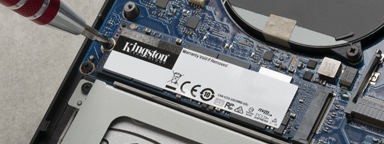
This is a step-by-step guide on installing an M.2 SSD into a laptop or desktop PC.
Why should you choose an SSD over an HDD? The main factor is better performance from SSDs.
Don’t pick the wrong type of SSD for your server. A wrong choice means a higher cost of ownership. Learn to pick the right SSDs.
It’s not just internet bandwidth you need when using Microsoft Teams and Zoom. The hardware matters too.
Understand the difference between a storage medium and a system's dynamic random-access memory.
Learn about types of NAND in SSDs like SLC, MLC, TLC, QLC, 3D NAND. What is Wear Leveling?
Having a dedicated workspace, setting priorities, and eliminating distractions are just a few ways to increase productivity from home.
Choosing the right SSD for your server is important since server SSDs are optimized to perform at a predictable latency level while client (desktop/laptop) SSDs are not. These difference result in better uptime and less lag for critical apps and services.














Based on the price records this catalogue holds — not a guarantee of an all-time high or low.
Lowest price across 14 retailers.
| Recorded | Price | Change | Lowest at |
|---|---|---|---|
| 2026-11-24 | 69 JOD | -80 JOD | Hiforit |
| 2026-10-30 | 149 JOD | +30 JOD | Green Dara Stars |
| 2026-10-25 | 119 JOD | -30 JOD | City Center |
| 2026-10-20 | 149 JOD | -30 JOD | Green Dara Stars |
| 2026-10-03 | 179 JOD | +80 JOD | Oriental Store |
| 2026-10-02 | 99 JOD | -80 JOD | Compu Jordan |
| 2026-09-26 | 179 JOD | +80 JOD | Oriental Store |
| 2026-09-25 | 99 JOD | -80 JOD | Compu Jordan |
| 2026-09-14 | 179 JOD | First recorded | Oriental Store |
KC600 · 2TB
Compared across 9 retailers
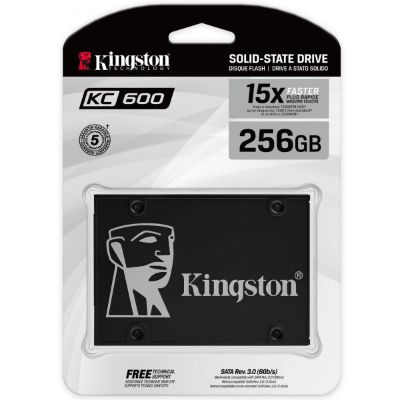
KC600 · 256GB
Compared across 15 retailers
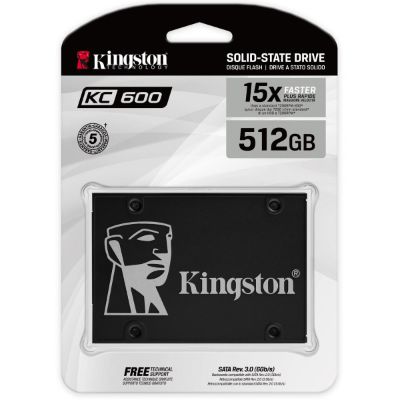
KC600 · 512GB
Compared across 17 retailers