30% off
Silent · Mice
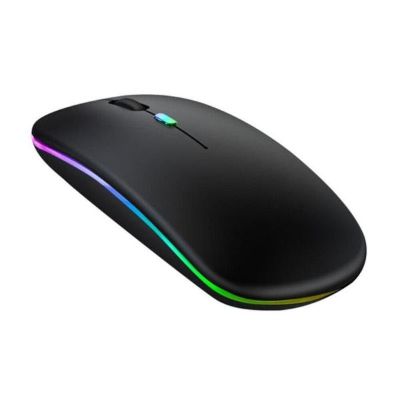
Mouse Wireless With Bluetooth (( Dual Mode )) Rechargeable Silent 3 Adjustable DPI Black RGBblack
7 JOD10In stock
Only at Digital Ring for Technology

black and white
| Retailer | Price | Availability | Actions |
|---|---|---|---|
 PC Circle | 3.95 JOD | Out of stock | Visit retailer |
Only one retailer in this catalogue is listing this product. Confirm the final price with the retailer.
Lowest offer added 2022-12-26 · Updated 2026-11-26 · No price change recorded
Search for other retailer offersMouse Wireless || Bluetooth || Dual Mode Slim || Rechargeable || Silent || 3 Adjustable DPI || Black || White
One Mouse, Two Devices
Have you ever wished that you can control your two computers with only one mouse? Now this dream comes true with a 2.4GHz wireless Bluetooth mouse, just toggle the Bluetooth / 2.4GHz switching, you can switch free to control the devices respectively.
Bluetooth Connection & 2.4GHz Wireless Connections
Bluetooth 4.0 connectivity & no USB interface required,greatly simplify your life.
For devices without Bluetooth function, this mouse also solves your problem with a Nano USB receiver.
How to use it:
A. 2.4Ghz Mode
① Switch to “ON/OFF” button to right.
② Plug the receiver into the USB port of your computer, Then you can use the mouse in 2.4GHz Mode.
B. Bluetooth Mode
① Turn on the device’s Bluetooth function.
② Switch to “ON/OFF” button to left. The blue light is on.
③ Press and hold the “Bluetooth Pairing” button for 3 seconds.
④ Start matching your device and the Bluetooth mouse when the blue light flashes.
⑤ Search the product of Bluetooth, the name is (Bluetooth Mouse 4.0).
⑥ Find “Bluetooth Mouse 4.0” and pair. Then you can use the mouse in Bluetooth Mode.
Note:
1. It’s out of power if the mouse cursor moves slowly or stop moving. Please recharge it.
2. Please charge the mouse for 2 hours before the first time to use it. The blue light beside the scroll wheel will be on while charging, and then goes off when the mouse is fully charged.
3. Not all computers support both modes at the same time. Please choose the appropriate mode according to your needs.
Based on the price records this catalogue holds — not a guarantee of an all-time high or low.
This retailer's price has not changed since it was first recorded on 2026-10-20, currently 3.95 JOD.
| Recorded | Price | Change |
|---|---|---|
| 2026-10-20 | 3.95 JOD | First recorded |
black
Only at Digital Ring for Technology
SM66
Compared across 5 retailers