V2COM · Monitors
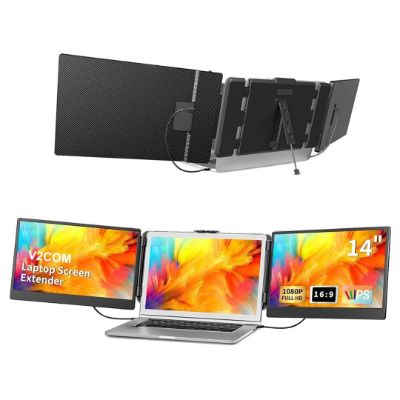
V2COM S2 14 IPS Full HD Triple Screen Extender Portable Monitor HDMI USB-A Type-C Built-in Speakers Fits 13-173 LaptopsS2 · 14 inch
from 195 JODIn stock
Compared across 5 retailers

Z1 · 14 inch
【Improve Efficiency 200% & Convenient Work Leisure & Save Time】-Our 14” Laptop Screen Extender Portable Monitor support you open multiple tasks at the same time, no need switch back and forth on single screen, save a lot time and increase your efficient up to 200%.Perfect for travel ,remote work, conference ,gaming,…
| Retailer | Price | Availability | Actions |
|---|---|---|---|
 City Center | 189 JOD | Out of stock | Visit retailer |
Only one retailer in this catalogue is listing this product. Confirm the final price with the retailer.
Lowest offer added 2026-10-25 · Updated 2026-11-23 · No price change recorded
Search for other retailer offers| Monitors Specifications | |
|---|---|
| Screen Size | 14.0" |
| Refresh Rate | 60 Hz |
| Panel Type | Full HD |
| Panel Technology | IPS |
| Contrast Ratio Static | 1000:1 |
| Resolution | 1920 x 1080 |
| Input Connectors | 2x USB Type C
1x USB C with DP 1x AUX 3.5 headphone port |
| Brightness | 280 cd/m2 |
| Display Colors | 16.9 Million |
| Advanced Feature | |
| Color | Silver |
| Speakers | Yes |
KEFEYA Portable Monitor for Laptop Screen Extender
Support you open multiple tasks at the same time and improve your work efficiency up to 200%!Perfect for people who working on the go,remote worker, watch movie,IT professionals, programmers, game player etc!
Specification:
Compatible :Most Windows,Mac OS,Linux,Intel ,Chrome,Switch,PS4/5,Xbox One (Suit Mac M1 Pro/Max , M2 Pro/Max , M1/ M2 chip laptop).
Applicable : All size laptops,Plug and play, no driver required
Screen:14 IN High resolution 1920x1200 P/ IPS 178°/ 300 nit brightness /72% NTSC color gamut /1:1000 contrast ratio
Bracket base :Support monitor 210°+ 360°angle sharing,And also support upper on laptop angle.
Support:Extend/ mirror/Landscape/portrait
Support independently : Turn On/OFF and adjust (brightness, volume, font size, backlight etc).
Lightweight aluminum shell : more durable, better for heat dissipation.
Easy use:Just need 1 USB-C to C cable ( full function offer video & power), Or HDMI to MINI HDMI cable (offer video) + USB-A to C cable ( offer power ).
Tips:Some laptop USB-C Port is not full function port (only support power or video ), Please check before use.
Advantage :
1. Improve Efficiency 200% & Convenient Work Leisure & Save Time
Our 14” Laptop Screen Extender Portable Monitor support you open multiple tasks at the same time, no need switch back and forth on single screen, save a lot time and increase your efficient up to 200%.Perfect for travel ,remote work, conference ,gaming, picture video design etc (Plug and play, no driver required,Applicable for all size Laptops (VS other only 13-17 IN) .
2. Widely applicable & Plug and Play No Need Driver
The Travel Portable Dual Second Monitor for Laptop compatible most Windows,MacOS,Linux,Intel,Chrome,Switch,PS4/5, Xbox One etc (Suit Mac M1 Pro/Max , M2 Pro/Max , M3 Pro/Max , M1/ M2 / M3 chip laptop). Just make sure your device or laptop has 1 USB-C port (full function),or 1 HDMI +1 USB-A port.
3. Multiple Use Mode & 210°+ 360°Sharing Angle
The Extension Laptop Monitor Extender offer multiple display modes(Extend/ Mirror/Landscape/Portrait ). The unique bracket base design support monitor 210°+ 360°angle sharing(VS other 180-270°),allow you customize view angles. Also help you easily share screen to others efficiency communicate .The Lightweight aluminum shell (Vs other plastic) is more durable, better for heat dissipation.
4.1920 x 1200P FHD IPS Monitor & Support Independently Adjust
14" Full FHD Portable Travel Dual Second Monitor configured with more higher resolution 1920x1200 ,offer IPS 178°clear images view angle,300 nit brightness, 72% NTSC color gamut, 1:1000 contrast ratio, provide a bright vivid and immersive visual experience.The Monitor also with button can be independently turn On/OFF and adjust (brightness, volume, font size, backlight etc).
5.Easy Use
Easy use,Just need 1 USB-C to C cable ( full function offer video & power), Or HDMI to MINI HDMI cable (offer video) + USB-A to C cable ( offer power ).
Some laptop USB-C Port is not full function port (only support power or video ), Please check before use.
Package :
Monitor Screen*1,
USB-C to C cable *1,
USB-A to C cable *1,
HDMI to MINI HDMI cable *1
Bag*1
Quick Guide:
Q1: How to check Tpye-C port on computer is an all-function port or not ?
A: If your laptop have a USB-C port with one of the following symbols (or the Thunderbolt 3, Thunderbolt 4, DP 1.2), then it is the Full-function Type-C port, you can use the USB C to C cable to connect each screen. (You can check the manual or go online to check the computer port parameters.)
Q2: Monitor Screen display show "No Signal"
A: 1>If you use USB-C to C connect, it means your computer's C port only support power not support video transmission,You can connect a HDMI cable to the monitor provide video transmission.
2>If you use HDMI cable (Provide video transmission). Please connect an USB-A/C to C cable (Provide power) 5V/2A to the monitor .
Q3: Monitor Screen Flickers & Black Screen
A:It may be that your laptop is low battery or voltage is insufficient,use an extra USB-A to C cable to power laptop or monitor screen extender.
Q4: Monitor screen not light up after connecting?
A:It may be that your laptop does not have enough power. Please charge the monitor with an extra power supply that provide 5V/2A.
Please active your laptop screen to avoid extender screen into sleep mode.
Based on the price records this catalogue holds — not a guarantee of an all-time high or low.
This retailer's price has not changed since it was first recorded on 2026-10-25, currently 189 JOD.
| Recorded | Price | Change |
|---|---|---|
| 2026-10-25 | 189 JOD | First recorded |
S2 · 14 inch
Compared across 5 retailers
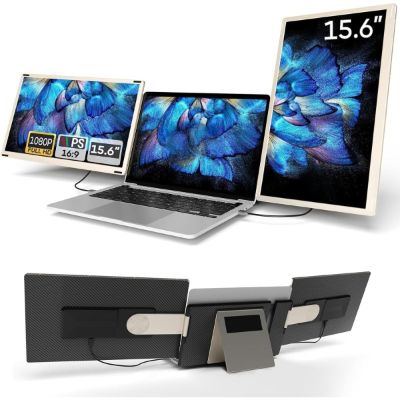
S6 · 15.6 inch
Compared across 3 retailers
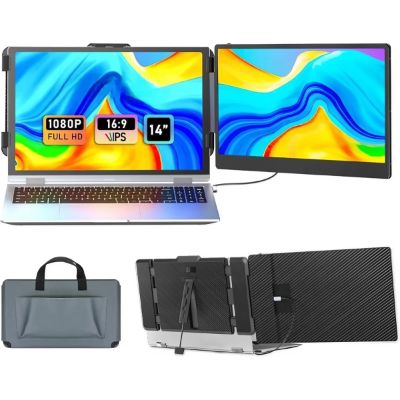
S1 · 14 inch
Compared across 3 retailers
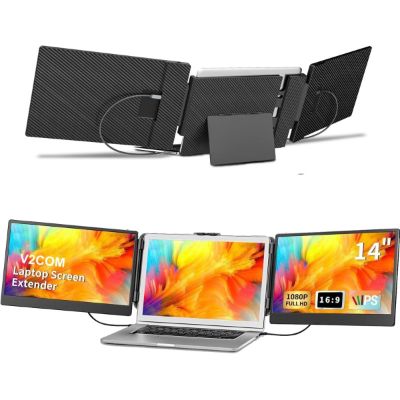
S3 · 14 inch
Only at City Center