13% off
Dell · Monitors
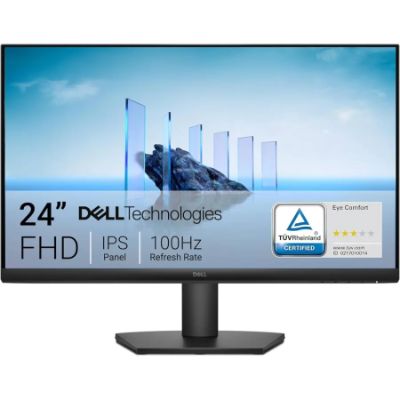
Dell SE2425HM 23.8-inch FHD IPS 100Hz MonitorSE2425HM · 24 inch
from 95 JODIn stock
Compared across 14 retailers

23.8"
Screen Size 24 inch, Touchscreen Type 10 point touch, Cabinet Color Black, Usage Consumer, Panel IPS, · Display Type Full HD, Maximum Resolution 1920 x 1080, Recommended Resolution 1920 x 1080, Viewing Angle 178 degree (H) / 178 degree (V), Pixel Pitch 0.275 millimeter, Display Colors 16.7 Million · Brightness 250…
Likely the same product — 1 of 2 listings publish part number P2418HT; the rest are matched on brand and model.
| Retailer | Price | Availability | Actions |
|---|---|---|---|
 City CenterLowest | 299 JOD | Out of stock | Visit retailer |
 MID Teks Inc | 334 JOD | Out of stock | Visit retailer |
These listings match on brand and model rather than on a manufacturer part number, so the match is likely but not confirmed. Check the specifications before you buy on price alone.
Lowest offer added 2021-12-25 · Updated 2026-11-25 · No price change recorded
| Product Specifications | |
|---|---|
| Manufacturers Link | https://www.dell.com/en-us/work/shop/dell-24-touch-monitor-p2418ht/apd/210-alcs/monitors-monitor-accessories |
| Monitors Specifications | |
| Screen Size | 23.8" |
| Flat / Curved | Flat |
| Panel Technology | IPS |
| Contrast Ratio Static | 8.000.000:1 |
| Resolution | 1920 x 1080 |
| Response Time | 6 ms |
| Display Port | Yes |
| HDMI | Yes |
| D-Sub | Yes |
| Color Saturation | 72% (NTSC) |
| Brightness | 250 cd/m2 |
| Display Colors | 16.7 M |
Intuitive touch: The 10-point touch feature delivers a more natural and responsive experience, so you can tap, swipe, slide and pinch in a snap. Enjoy smoother navigation with two-handed touch control across the anti-glare screen, from edge-to-edge.
Work from any position:
An articulating stand transitions from a standard desktop monitor to a downward 60-degree angle touch orientation. It also supports extended tilt and swivel capabilities, so you can adjust the screen to your task or a more comfortable position. Plus, a protective cushion offers a durable buffer against bumps when the stand is fully compressed.
See clearly:
State-of-the-art Advanced In-Cell Touch technology eliminates the need for the glass screen found in traditional monitors, delivering an anti-glare surface that reduces distracting reflections and fingerprints. The result is a smooth display with improved clarity that’s easy on the eyes.
A seamless view:
An ultrathin bezel is a stylish, elegant way to achieve unobstructed views when working across multiple monitors.
Product Brochure: Download the PDF file for the Dell 24 Touch Monitor - P2418HT
Stunning views: Full HD resolution and an 8 million to 1 dynamic contrast ratio create an exceptional quality display. See consistent colors and effectively collaborate across the 178ᵒ /178ᵒ wide viewing angle enabled by In-Plane Switching Technology.
Work comfortably:
Enjoy an anti-glare, flicker-free screen with ComfortView™, a feature that filters out harmful blue light emissions. Plus, it’s TUV Certifiedi.
Freedom from clutter:
Collaborate in an organized workspace with a thoughtfully designed cable management system. Cable routing prevents cables from getting in the way when your monitor stand is adjusted down, while a cable sleeve binds them together. Connectivity ports are discreetly concealed by a cable cover.
Multitask: The Dell Display Manager software lets you multitask and save time. Quickly tile and view applications side by side with the Easy Arrange feature. Customize and pre-set the color settings of your applications with Auto-Mode.
Connectivity ports:
Extensive connectivity ports including VGA, DP, HDMI, USB3.0 and USB2.0 allow you to easily connect to a wide range of devices.
Ideal for multiple layouts:
Adapt to different office layouts thanks to VESA-compatibility. Choose to mount your monitor to the wall or attach it to monitor arms and enjoy a more flexible workspace.
Based on the price records this catalogue holds — not a guarantee of an all-time high or low.
Lowest price across 2 retailers.
The lowest price has not changed since it was first recorded on 2026-10-27, currently 299 JOD.
| Recorded | Price | Change | Lowest at |
|---|---|---|---|
| 2026-10-27 | 299 JOD | First recorded | City Center |
SE2425HM · 24 inch
Compared across 14 retailers
E2723HN · 27 inch
Compared across 2 retailers
E2723H · 27 inch
Compared across 2 retailers
SE2725H · 27 inch
Compared across 2 retailers